jcalendar javascript widget, IE, language preference is French.
'Calendar._TT.DEF_DATE_FORMAT' is null or not an object.
solution, convert the .../lang/calendar-fr.js to UTF-8 encoding, recommended notepad++.
Tuesday, August 04, 2009

Thursday, July 30, 2009
SAP Portal - XML Form
Create a XML form
You need Content Manager role in the portal. Content Management -> Forms Builder. You can create a XML form project from scratch or use an existing one as base. Check the Global Settings, usually the project store is /irj/go/km/docs/etc/xmlforms and server is https://<>:443/. Remember the ID, e.g. my_Form123.
Transport the form to another portal
A ICE subscriber and syndicate way is suggested all over the Internet. Somehow I was not able to get it work. Instead, I simply copied the files under /etc/xmlforms/ to the destination portal and it worked fine for me. It did give me a bit of trouble when I previewed the form for the first time after transported. However, it worked fine at the second time.
Folder Settings
You then need the System Administration role. System Administration -> System Configuration -> Knowledge Management -> Content Management -> Form-Based Publishing -> Forms Availability -> Folder Settings
Add a new Form/Folder setting,
ID(my_form):priority(80):Folder Path(/documents/public_news/**):Forms to Exclude(SAP_APP_*):Forms to Include(my_Form123).
You shall see my_Form123 in the new selection menu of the folder.
You need Content Manager role in the portal. Content Management -> Forms Builder. You can create a XML form project from scratch or use an existing one as base. Check the Global Settings, usually the project store is /irj/go/km/docs/etc/xmlforms and server is https://<>:443/. Remember the ID, e.g. my_Form123.
Transport the form to another portal
A ICE subscriber and syndicate way is suggested all over the Internet. Somehow I was not able to get it work. Instead, I simply copied the files under /etc/xmlforms/
Folder Settings
You then need the System Administration role. System Administration -> System Configuration -> Knowledge Management -> Content Management -> Form-Based Publishing -> Forms Availability -> Folder Settings
Add a new Form/Folder setting,
ID(my_form):priority(80):Folder Path(/documents/public_news/**):Forms to Exclude(SAP_APP_*):Forms to Include(my_Form123).
You shall see my_Form123 in the new selection menu of the folder.
Wednesday, July 22, 2009
SAP Portal - EP CRM Roles
Initially, you export Roles from CRM into a XML file. The PCD location is the folder pre-created on EP to hold the incoming roles.
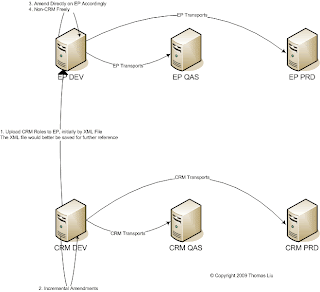
You then import the XML file into EP and roles will be created in EP. Remember to save the XML file for future reference.
You then can change on CRM, but need to make the same change directly on EP, not through export/import. You can also make any changes that you want on EP, e.g. to add some BI contents.
You transport changes to CRM QAS and PRD from CRM DEV, to EP QAS and PRD from EP DEV.

You then import the XML file into EP and roles will be created in EP. Remember to save the XML file for future reference.
You then can change on CRM, but need to make the same change directly on EP, not through export/import. You can also make any changes that you want on EP, e.g. to add some BI contents.
You transport changes to CRM QAS and PRD from CRM DEV, to EP QAS and PRD from EP DEV.
Wednesday, July 15, 2009
SAP Portal - Missing Portal Content
Once I was assigned the Content Admin role in a portal but can't see the Portal Content under PCD. Weird, right?
OK, at the end, we figured it out. After the installation, the Super Admin needs to click on the Portal Content under PCD and grant the permission to Content Admin role.
OK, at the end, we figured it out. After the installation, the Super Admin needs to click on the Portal Content under PCD and grant the permission to Content Admin role.
Friday, June 05, 2009
SAP Portal - KM Navigation Layout Set Mode
- Default means that settings in this iView layout set may be overlaid by existing object type handler settings (these are settings for a specific type of object).
- Exclusive means that the iView settings may overlay the object type handler settings.
SAP Portal - KM Navigation Layout
Usually you use NewsBrowser as the layout set for a KM Navigation iView.
You can use another layout set. First you need to know what are the choices.
System Administration -> System Configuration -> Knowledge Management -> Content Management -> User Interface -> Settings -> Layout Set
On SAP Enterprise Portal 7.0.18, there are 125 layout sets available.
You can use another layout set. First you need to know what are the choices.
System Administration -> System Configuration -> Knowledge Management -> Content Management -> User Interface -> Settings -> Layout Set
On SAP Enterprise Portal 7.0.18, there are 125 layout sets available.
Friday, May 29, 2009
SAP Portal - BEx
Well, this is my first BEx iView.
We have a dedicated BI installed, which means outside the Portal. We have already defined it as System Dxx.
I am the Content Administrator on the Portal, but have no role on the BI. Thus I can't preview the BEx.
So I request to have at least a display role on the BI.
I then go through the BEx (7.0) wizard, and define the query string as template=ZXXX_XXX_XXXX and it's done.
Easy.
We have a dedicated BI installed, which means outside the Portal. We have already defined it as System Dxx.
I am the Content Administrator on the Portal, but have no role on the BI. Thus I can't preview the BEx.
So I request to have at least a display role on the BI.
I then go through the BEx (7.0) wizard, and define the query string as template=ZXXX_XXX_XXXX and it's done.
Easy.
SAP Portal - Why afterInit()
During the life cycle of a Portal Service, the Portal Runtime calls the init(IServiceContext) when the service is loaded in memory, the afterInit() when the init returns, the destroy() when the service is stopped.
So is the afterInit() something unnecessary? Can we merge afterInit() into init()?
No. Actually the afterInit() is called after all services in the portal runtime have already been initialized. Suppose you need to call another service to initialize this service, you can't do it in the init() since you have no promise from the Portal Runtime that certain service will be up before others. You will have to do it in the afterInit().
So is the afterInit() something unnecessary? Can we merge afterInit() into init()?
No. Actually the afterInit() is called after all services in the portal runtime have already been initialized. Suppose you need to call another service to initialize this service, you can't do it in the init() since you have no promise from the Portal Runtime that certain service will be up before others. You will have to do it in the afterInit().
Thursday, May 28, 2009
SAP Portal - Federated Portal Network (FPN)
FPN is nowadays a hot topic. Someones (my SAP instructor) dislike it, some others (a consultant) like it.
For us, it seems inevitable. We have to place the EP as the consumer and CRM and BI as producers.
In this case, we are actually doing something called Content Federation.
Another way of FPN is Portal Federation, which, to my understanding, is more complicated and only make sense if you do have more than one site of SAP landscapes.
For us, it seems inevitable. We have to place the EP as the consumer and CRM and BI as producers.
In this case, we are actually doing something called Content Federation.
Another way of FPN is Portal Federation, which, to my understanding, is more complicated and only make sense if you do have more than one site of SAP landscapes.
SAP Portal - TREX
EP Knowledge Management includes two major elements, the Content Management and the Search and Classification Engine.
Installation of the Search and Classification Engine is required to use the functionality of Knowledge Management completely. The Engine is formerly known as TREX - text retrieval and classification.
Installation of the Search and Classification Engine is required to use the functionality of Knowledge Management completely. The Engine is formerly known as TREX - text retrieval and classification.
Wednesday, May 27, 2009
SAP Portal - Resource
A component can reference a Web resource packaged in its application or in another application by retrieving an IResource object for the resource from the IPortalComponentRequest object, as in the following examples:
For a resource in the same application:
request.getResource(IResource.IMAGE,"images/myImage.gif");
For a resource in another application:
request.getResource("myApp",IResource.IMAGE,"images/myImage.gif");
A component can use a Web resource, for example, to create a link to the
resource or to include it in its content.
For a resource in the same application:
request.getResource(IResource.IMAGE,"images/myImage.gif");
For a resource in another application:
request.getResource("myApp",IResource.IMAGE,"images/myImage.gif");
A component can use a Web resource, for example, to create a link to the
resource or to include it in its content.
WinSCP - Unix Daylight Saving Time
 When Unix changes to Daylight Save Time or back from DST, WinSCP by default will show one hour difference from the real timestamp of the file in Unix.
You need to change the Environment setting Daylight saving time to Preserve remote timestamp (Unix).
Note this will disable the synchronization function in WinSCP between the two systems.
Tuesday, May 26, 2009
SAP Portal - Workset
For example, add two iViews into a workset and assign the workset to a role.
The workset will appear as subgroup at the top-level navigation bar. The two iViews will appear in the Detailed Navigation panel.
Worksets can only be assigned to roles and not directly to users. Worksets are particularly useful if a lot of content is assigned to a role.
The workset will appear as subgroup at the top-level navigation bar. The two iViews will appear in the Detailed Navigation panel.
Worksets can only be assigned to roles and not directly to users. Worksets are particularly useful if a lot of content is assigned to a role.
SAP Portal - Theme and Portal Desktop
Default Desktop is under Portal Content/Portal Users/Standard Portal Users/Default Portal Desktop.
After a new theme is created, it is placed under Portal Content/themes.
You need to add the new theme to the Desktop before end users can choose the new theme.
You can only see desktops and themes by System Administration/Portal Display/Desktops & Display Rules.
After a new theme is created, it is placed under Portal Content/themes.
You need to add the new theme to the Desktop before end users can choose the new theme.
You can only see desktops and themes by System Administration/Portal Display/Desktops & Display Rules.
SAP Portal - Collapse Portal Favorite
By default, it expands the Portal Favorite. To collapse it, open the entry point of the role, either a page or a iView of a page, select the Navigation in the Property Category, and set Initial State of Navigation Panel from Automatic (default) to Always Close.
If choose Close, Portal will restore the state of the Portal Favorite when user last exits.
If choose Close, Portal will restore the state of the Portal Favorite when user last exits.
SAP Portal - FAQ 5
1. What is the difference between authentication and Single Sign-On?
In computer security, authentication is the process by which a computer, computer program, or another user attempts to confirm that the computer, computer program, or user from whom the second party has received some communication is, or is not, the claimed first party.
Single Sign-On is the subsequent automated authentication for additional systems after the user has logged on once. In this case, the authenticating system passes the user information to the subsequently called system. This is done in the background; that is, the user does not need to authenticate himself or herself again after his or her first logon.
2. What options are there for authentication for the SAP Web Application Server?
2.1 Web-based authentication methods
• Anonymous/ guest access
• User ID/ password (only authentication, not Single Sign-On)
o Form based
o Basic authentication
• X.509 digital certificates
• SAP Logon Tickets
• External authentication methods
o HTTP header variable authentication (not ABAP except for X.509 certificate information forwarding)
o Security Assertion Markup Language (SAML – only Java)
o Through Java Authentication and Authorization Services (JAAS – only Java). External authentication can be performed using a JAAS module with SAP Web Application Server 6.30. The module is not supplied by SAP, but can be implemented by customers and connected using a standardized interface. JAAS allows you to set a separate authentication mechanism for each application
2.2 SAP GUI for Windows
• SAP-certified SNC product, external security product (authentication takes place outside of SAP system)
• SAP provided wrappers for Microsoft Windows authentication mechanisms:
o Windows NTLM
o Windows 2000 Kerberos
• SAP Shortcut Method (SAP Logon Ticket)
SNC is an integration layer with which a partner product for user authentication can be included in the SAP system landscape. SNC can only be used with SAP protocols (DIAG, RFC, SAP ITS AGate/WGate), and not with the Internet protocol HTTP. This means that it cannot be used with SAP GUI for HTML; only SAP GUI for Java und SAP GUI for Windows can be secured using SNC. Pluggable Authentication Service (PAS) can be used for Web-based access - see below.
In addition to the integration of a third-party product, you can also use existing authentication infrastructures, for example for Microsoft Windows NT or Microsoft Windows 2000 through SNC. For an overview of the partner products certified by SAP for this interface (which is based on the Generic Security Services [GSS] standard), see Security Partners.
The user logs on to the partner product; the SNC user name is then mapped to the SAP user name. The SAP system accepts the logon information, and additional authentication is not required. Security mechanisms of different strengths can be used, such as, such as Public-Key cryptography or Kerberos, depending on the product you are using.
SAP provides mapping libraries free of charge for Microsoft Windows NT and Microsoft Windows 2000. These do not contain any cryptographic functions themselves, but rather access the relevant Microsoft Security Provider APIs. These can be used instead of a partner product.
For more information, see http://service.sap.com/security > Security in Detail > Secure System Management
2.3 SAP WebGUI
• X.509 client certificate
• SAP Logon Ticket
**
3. What options are there for single sign-on for SAP GUI?
The procedure used for Single Sign-On depends on the SAP GUI in use.
SAP GUI for HTML (Available with SAP Web AS and SAP ITS)
• SSO can be implemented using SAP Logon Tickets. This is a proprietary SAP solution, contain in the standard version of the software. For more information about SAP Logon Tickets, see How do SAP logon tickets work?.
• SSO can also be implemented using digital certificates - see authentication. There are advantages and disadvantages to this approach, as described under Which is the most secure option?.
• For the ITS, you can also implement external authentication using the Pluggable Authentication Service (PAS). For more information, see Is it possible to connect products from external vendors to implement authentication and SSO outside the SAP system. For more detailed information, see the relevant documentation.
SAP GUI for Java
• SNC can be used in this case; see also Is it possible to connect products from external vendors to implement authentication and SSO outside the SAP system.
SAP GUI for Windows
• You can implement SSO using SNC through a partner product; see also Is it possible to connect products from external vendors to implement authentication and SSO outside the SAP system.
• A cost-effective alternative to a partner product is to use Microsoft Windows NTLM or Microsoft Kerberos, which is contained in Microsoft operating systems at no additional cost. This variant can only be implemented in a purely Microsoft environment; if other components are used, you must purchase an additional partner product (for more information, see SAP Note 352295). For information about certified partners that provide suitable products for SNC, see Security Partners.
• You can implement SSO using SAP Shortcuts. These are available as of SAP R/3 4.0B under Microsoft Windows NT and Microsoft Windows 95 installations. SAP Shortcuts are useful for frequently used transactions or reports; a shortcut of this type means that they can be started directly from the desktop. System data, the name of the transaction or report, and the user’s logon data are stored in the shortcut. The password can also be stored here; this means that it is not necessary to enter it again during the logon. However, we recommend that you exercise caution in this situation: SAP Shortcuts store the logon data directly on the front end. As any user that can access the front end desktop can also activate the shortcut, if there is a lack of security at the front end, there is a danger that the logon data will be misused. The SAP Shortcut could also be copied to another front end computer, if access to the file system is not appropriately secured. Passwords should therefore only be stored in SAP Shortcuts if there is adequate security at the front end. You should also note that this is not a genuine Single Sign-On scenario, as each SAP Shortcut is a separate logon to the relevant SAP system. However, an actual Single Sign-On solution for SAP Shortcuts can be implemented in connection with SNC. As of SAP R/3 4.5, the SNC procedure for SSO also applies for SAP Shortcuts. For more information about SAP Shortcuts, see the SAP R/3 online documentation (as of SAP R/3 4.5) under General Information > Getting Started with R/3 > Daily Start-Up/Shutdown of the R/3 System > SAP Shortcut and SAP Note 99054 .
**
4. Must a user have the same password in all systems that are part of an SSO landscape?
No. The passwords can be different in the different systems; this does not affect the setting up of Single Sign-On in any way.
5. After a year, Single Sign-On suddenly no longer works. What could the reason for this be?
This error can occur due to an expired server certificate on the system that issues the SAP Logon Tickets. Certificates for servers, which are signed by a Certification Authority (CA) such as the SAP Trust Center Service (SAP_CA), are usually valid for a year. Although the SAP Logon Tickets for SSO are still issued after this period, an error message is triggered by the receiving system when it checks the certificates. "Self-signed" certificates, which are not issued by a CA, but by the server itself, usually have a significantly longer validity period. To avoid the certificates expiring in future, a new report has been created that provides warning in good time before the expiration of the validity of installed certificates. For more information about this, see SAP Notes 572035(Warning about expired security certificates) and 499386 ("Invalid logon ticket" for CA certificates).
6. How do SAP logon tickets work? Can they also be used to include non-SAP products in an SSO environment?
SAP Logon Tickets generate SSO for SAP solutions with Web-based access, that is, for applications that are based on SAP Web Application Server or SAP ITS. An SAP Logon Ticket is used only for the purposes of SSO and cannot be used for initial authentication. To obtain a Logon Ticket, the user must first logon using a different procedure, such as a user name and a password or a digital certificate. The Logon Ticket is contained in a cookie that is forwarded to the user’s Web browser by the issuing system. It is forwarded from the user’s browser to the subsequently called systems that are integrated into the SSO landscape. The user logs on only once. The ticket itself contains the user name, a timestamp, information about the issuing system, and a certain validity period, which can be configured using a system profile parameter , and which can range from a few minutes to several hours. To protect the authenticity and the integrity of the ticket, it is digitally signed by the issuing system. The prerequisite for the use of SAP Logon Tickets is the use of identical user names in the systems that issue and accept the ticket. The SAP Enterprise Portal is an exception to this rule; in this case, an external user name can be specified in the ticket itself.
The advantage of SAP Logon Tickets over an SSO solution using digital certificates is that the (person-related) Public-Key Infrastructure, which is required to administer digital certificates and can be cost-intensive, is not required. Logon Tickets that have already been checked can be buffered for the duration of their validity, which improves performance. To avoid it being stolen through interception, the ticket should be protected using SSL. Many external systems can also be configured to accept and verify SAP Logon Tickets. You can do this using a library provided by SAP, which is then integrated into the external software. The following SAP systems can issues SAP Logon Tickets: systems as of SAP Basis 4.6C (see SAP Note 358469), SAP Web Application Server 6.10 and above, SAP Enterprise Portal 5.0 and above. SAP systems as of SAP Basis 4.0 can accept SAP Logon Tickets (see SAP Note 177895).
7. Are authentication and SSO connected with Central User Administration (CUA)?
No. Central User Administration simply centralizes the administration of user and role data across a large number of SAP systems. The data contained there only applies after the user has already logged on; authentication and, if appropriate, Single Sign-On have therefore already taken place. Setting up a CUA therefore does not affect authentication and SSO procedures in any way; however, it does provide the basis for the use of SAP Logon Tickets due to the assignment of uniform cross-system user names. Implementing CUA also does not provide any form of password synchronization between the central and child systems. Initial passwords are an exception to this rule, and it is also possible to reset passwords. This can be done both in the local child systems and in the central system (with distribution to selected systems).
8. Are authentication and SSO connected with LDAP user data synchronization (LDAP Connector, LDAPMAP)?
No. Since SAP Basis 4.6, SAP systems have had an LDAP Connector, which allows connection to an LDAP directory. However, only individual accesses to the LDAP directory are possible in this version. Data synchronization between SAP R/3 and the LDAP directory was standardized with SAP Web AS 6.10, and mass synchronization is possible. The data synchronization applies only to user and role data, however. Authentication and SSO functions are provided neither using the LDAP Connector nor through transaction LDAPMAP. For information about transferring an external authentication to the LDAP directory, see Is it possible to connect products from external vendors to implement authentication and SSO outside the SAP system?.
9. How do authentication and SSO work in the SAP NW Portal?
The SAP Netweaver Portal offers the same possibilities for user authentication as SAP Netweaver AS Java. In Addition Account Aggregation ist supported. With this procedure, a portal user (or a user group) is associated with the user name and password for an application. This allows SSO even for applications that cannot accept SAP Logon Tickets. The administrator, or the user can perform the required mapping using a graphical interface. The portal stores the data in the portal database. For security reasons, all password information is encrypted using a triple DES algorithm.
For more information about authentication and SSO in the SAP Enterprise Portal, see Solution in Detail: Security in the mySAP Enterprise Portal.
10. Does SAP offer a Trust Center?
Yes. For more information, see the SAP Service Marketplace using the alias TCS. SAP offers client certificates, server certificates, for example, for Secure Socket Layer, and router certificates for service connections through SAPRouter.
11. Where is the SAP Passport physically stored?
Passports are stored wherever the browser stores its certificates. In the case of Microsoft Internet Explorer, this is the registry. You can usually also replace the browser storage using a third party product, for example a smart card or a central Personal Security Environment (PSE) server.
12. SAP Passports - where can I learn more about it?
On SAP Service Marketplace at htttp://service.sap.com/~form/sapnet?_SHORTKEY=01100035870000282722& you find a detailed description of the process in the presentation "SAP Passports - How to get started". To test SAP passport functionality in your SAP Workplace, please generate a Certificate Request (CR) and send message on component BC-SEC to SAP via SAP Net R/3 Frontend (OSS) or SAP Service Marketplace. We will send you the necessary certificate for your Registration Authority (RA).
13. Does SAP also support newer standards, such as SAML or the Liberty Alliance Project?
Security Assertion Markup Language (SAML) With SAP Web Application Server 6.30, the SAP J2EE Engine can accept SAML tickets for logon in the browser artifact scenario. For more information about SAML,
SAP is a sponsor of Liberty Alliance Project, an initiative to establish a standard for federated digital identities on the Web. Its aim is to use specifications to develop open standards that can be used internationally across industries.
In computer security, authentication is the process by which a computer, computer program, or another user attempts to confirm that the computer, computer program, or user from whom the second party has received some communication is, or is not, the claimed first party.
Single Sign-On is the subsequent automated authentication for additional systems after the user has logged on once. In this case, the authenticating system passes the user information to the subsequently called system. This is done in the background; that is, the user does not need to authenticate himself or herself again after his or her first logon.
2. What options are there for authentication for the SAP Web Application Server?
2.1 Web-based authentication methods
• Anonymous/ guest access
• User ID/ password (only authentication, not Single Sign-On)
o Form based
o Basic authentication
• X.509 digital certificates
• SAP Logon Tickets
• External authentication methods
o HTTP header variable authentication (not ABAP except for X.509 certificate information forwarding)
o Security Assertion Markup Language (SAML – only Java)
o Through Java Authentication and Authorization Services (JAAS – only Java). External authentication can be performed using a JAAS module with SAP Web Application Server 6.30. The module is not supplied by SAP, but can be implemented by customers and connected using a standardized interface. JAAS allows you to set a separate authentication mechanism for each application
2.2 SAP GUI for Windows
• SAP-certified SNC product, external security product (authentication takes place outside of SAP system)
• SAP provided wrappers for Microsoft Windows authentication mechanisms:
o Windows NTLM
o Windows 2000 Kerberos
• SAP Shortcut Method (SAP Logon Ticket)
SNC is an integration layer with which a partner product for user authentication can be included in the SAP system landscape. SNC can only be used with SAP protocols (DIAG, RFC, SAP ITS AGate/WGate), and not with the Internet protocol HTTP. This means that it cannot be used with SAP GUI for HTML; only SAP GUI for Java und SAP GUI for Windows can be secured using SNC. Pluggable Authentication Service (PAS) can be used for Web-based access - see below.
In addition to the integration of a third-party product, you can also use existing authentication infrastructures, for example for Microsoft Windows NT or Microsoft Windows 2000 through SNC. For an overview of the partner products certified by SAP for this interface (which is based on the Generic Security Services [GSS] standard), see Security Partners.
The user logs on to the partner product; the SNC user name is then mapped to the SAP user name. The SAP system accepts the logon information, and additional authentication is not required. Security mechanisms of different strengths can be used, such as, such as Public-Key cryptography or Kerberos, depending on the product you are using.
SAP provides mapping libraries free of charge for Microsoft Windows NT and Microsoft Windows 2000. These do not contain any cryptographic functions themselves, but rather access the relevant Microsoft Security Provider APIs. These can be used instead of a partner product.
For more information, see http://service.sap.com/security > Security in Detail > Secure System Management
2.3 SAP WebGUI
• X.509 client certificate
• SAP Logon Ticket
**
3. What options are there for single sign-on for SAP GUI?
The procedure used for Single Sign-On depends on the SAP GUI in use.
SAP GUI for HTML (Available with SAP Web AS and SAP ITS)
• SSO can be implemented using SAP Logon Tickets. This is a proprietary SAP solution, contain in the standard version of the software. For more information about SAP Logon Tickets, see How do SAP logon tickets work?.
• SSO can also be implemented using digital certificates - see authentication. There are advantages and disadvantages to this approach, as described under Which is the most secure option?.
• For the ITS, you can also implement external authentication using the Pluggable Authentication Service (PAS). For more information, see Is it possible to connect products from external vendors to implement authentication and SSO outside the SAP system. For more detailed information, see the relevant documentation.
SAP GUI for Java
• SNC can be used in this case; see also Is it possible to connect products from external vendors to implement authentication and SSO outside the SAP system.
SAP GUI for Windows
• You can implement SSO using SNC through a partner product; see also Is it possible to connect products from external vendors to implement authentication and SSO outside the SAP system.
• A cost-effective alternative to a partner product is to use Microsoft Windows NTLM or Microsoft Kerberos, which is contained in Microsoft operating systems at no additional cost. This variant can only be implemented in a purely Microsoft environment; if other components are used, you must purchase an additional partner product (for more information, see SAP Note 352295). For information about certified partners that provide suitable products for SNC, see Security Partners.
• You can implement SSO using SAP Shortcuts. These are available as of SAP R/3 4.0B under Microsoft Windows NT and Microsoft Windows 95 installations. SAP Shortcuts are useful for frequently used transactions or reports; a shortcut of this type means that they can be started directly from the desktop. System data, the name of the transaction or report, and the user’s logon data are stored in the shortcut. The password can also be stored here; this means that it is not necessary to enter it again during the logon. However, we recommend that you exercise caution in this situation: SAP Shortcuts store the logon data directly on the front end. As any user that can access the front end desktop can also activate the shortcut, if there is a lack of security at the front end, there is a danger that the logon data will be misused. The SAP Shortcut could also be copied to another front end computer, if access to the file system is not appropriately secured. Passwords should therefore only be stored in SAP Shortcuts if there is adequate security at the front end. You should also note that this is not a genuine Single Sign-On scenario, as each SAP Shortcut is a separate logon to the relevant SAP system. However, an actual Single Sign-On solution for SAP Shortcuts can be implemented in connection with SNC. As of SAP R/3 4.5, the SNC procedure for SSO also applies for SAP Shortcuts. For more information about SAP Shortcuts, see the SAP R/3 online documentation (as of SAP R/3 4.5) under General Information > Getting Started with R/3 > Daily Start-Up/Shutdown of the R/3 System > SAP Shortcut and SAP Note 99054 .
**
4. Must a user have the same password in all systems that are part of an SSO landscape?
No. The passwords can be different in the different systems; this does not affect the setting up of Single Sign-On in any way.
5. After a year, Single Sign-On suddenly no longer works. What could the reason for this be?
This error can occur due to an expired server certificate on the system that issues the SAP Logon Tickets. Certificates for servers, which are signed by a Certification Authority (CA) such as the SAP Trust Center Service (SAP_CA), are usually valid for a year. Although the SAP Logon Tickets for SSO are still issued after this period, an error message is triggered by the receiving system when it checks the certificates. "Self-signed" certificates, which are not issued by a CA, but by the server itself, usually have a significantly longer validity period. To avoid the certificates expiring in future, a new report has been created that provides warning in good time before the expiration of the validity of installed certificates. For more information about this, see SAP Notes 572035(Warning about expired security certificates) and 499386 ("Invalid logon ticket" for CA certificates).
6. How do SAP logon tickets work? Can they also be used to include non-SAP products in an SSO environment?
SAP Logon Tickets generate SSO for SAP solutions with Web-based access, that is, for applications that are based on SAP Web Application Server or SAP ITS. An SAP Logon Ticket is used only for the purposes of SSO and cannot be used for initial authentication. To obtain a Logon Ticket, the user must first logon using a different procedure, such as a user name and a password or a digital certificate. The Logon Ticket is contained in a cookie that is forwarded to the user’s Web browser by the issuing system. It is forwarded from the user’s browser to the subsequently called systems that are integrated into the SSO landscape. The user logs on only once. The ticket itself contains the user name, a timestamp, information about the issuing system, and a certain validity period, which can be configured using a system profile parameter , and which can range from a few minutes to several hours. To protect the authenticity and the integrity of the ticket, it is digitally signed by the issuing system. The prerequisite for the use of SAP Logon Tickets is the use of identical user names in the systems that issue and accept the ticket. The SAP Enterprise Portal is an exception to this rule; in this case, an external user name can be specified in the ticket itself.
The advantage of SAP Logon Tickets over an SSO solution using digital certificates is that the (person-related) Public-Key Infrastructure, which is required to administer digital certificates and can be cost-intensive, is not required. Logon Tickets that have already been checked can be buffered for the duration of their validity, which improves performance. To avoid it being stolen through interception, the ticket should be protected using SSL. Many external systems can also be configured to accept and verify SAP Logon Tickets. You can do this using a library provided by SAP, which is then integrated into the external software. The following SAP systems can issues SAP Logon Tickets: systems as of SAP Basis 4.6C (see SAP Note 358469), SAP Web Application Server 6.10 and above, SAP Enterprise Portal 5.0 and above. SAP systems as of SAP Basis 4.0 can accept SAP Logon Tickets (see SAP Note 177895).
7. Are authentication and SSO connected with Central User Administration (CUA)?
No. Central User Administration simply centralizes the administration of user and role data across a large number of SAP systems. The data contained there only applies after the user has already logged on; authentication and, if appropriate, Single Sign-On have therefore already taken place. Setting up a CUA therefore does not affect authentication and SSO procedures in any way; however, it does provide the basis for the use of SAP Logon Tickets due to the assignment of uniform cross-system user names. Implementing CUA also does not provide any form of password synchronization between the central and child systems. Initial passwords are an exception to this rule, and it is also possible to reset passwords. This can be done both in the local child systems and in the central system (with distribution to selected systems).
8. Are authentication and SSO connected with LDAP user data synchronization (LDAP Connector, LDAPMAP)?
No. Since SAP Basis 4.6, SAP systems have had an LDAP Connector, which allows connection to an LDAP directory. However, only individual accesses to the LDAP directory are possible in this version. Data synchronization between SAP R/3 and the LDAP directory was standardized with SAP Web AS 6.10, and mass synchronization is possible. The data synchronization applies only to user and role data, however. Authentication and SSO functions are provided neither using the LDAP Connector nor through transaction LDAPMAP. For information about transferring an external authentication to the LDAP directory, see Is it possible to connect products from external vendors to implement authentication and SSO outside the SAP system?.
9. How do authentication and SSO work in the SAP NW Portal?
The SAP Netweaver Portal offers the same possibilities for user authentication as SAP Netweaver AS Java. In Addition Account Aggregation ist supported. With this procedure, a portal user (or a user group) is associated with the user name and password for an application. This allows SSO even for applications that cannot accept SAP Logon Tickets. The administrator, or the user can perform the required mapping using a graphical interface. The portal stores the data in the portal database. For security reasons, all password information is encrypted using a triple DES algorithm.
For more information about authentication and SSO in the SAP Enterprise Portal, see Solution in Detail: Security in the mySAP Enterprise Portal.
10. Does SAP offer a Trust Center?
Yes. For more information, see the SAP Service Marketplace using the alias TCS. SAP offers client certificates, server certificates, for example, for Secure Socket Layer, and router certificates for service connections through SAPRouter.
11. Where is the SAP Passport physically stored?
Passports are stored wherever the browser stores its certificates. In the case of Microsoft Internet Explorer, this is the registry. You can usually also replace the browser storage using a third party product, for example a smart card or a central Personal Security Environment (PSE) server.
12. SAP Passports - where can I learn more about it?
On SAP Service Marketplace at htttp://service.sap.com/~form/sapnet?_SHORTKEY=01100035870000282722& you find a detailed description of the process in the presentation "SAP Passports - How to get started". To test SAP passport functionality in your SAP Workplace, please generate a Certificate Request (CR) and send message on component BC-SEC to SAP via SAP Net R/3 Frontend (OSS) or SAP Service Marketplace. We will send you the necessary certificate for your Registration Authority (RA).
13. Does SAP also support newer standards, such as SAML or the Liberty Alliance Project?
Security Assertion Markup Language (SAML) With SAP Web Application Server 6.30, the SAP J2EE Engine can accept SAML tickets for logon in the browser artifact scenario. For more information about SAML,
SAP is a sponsor of Liberty Alliance Project, an initiative to establish a standard for federated digital identities on the Web. Its aim is to use specifications to develop open standards that can be used internationally across industries.
Friday, May 22, 2009
SAP Portal - Difference Between DynPage and JSPDynPage
DynPage is part of HTMLB not of Portal, which means it might be used in places or programs other than Portal. But JSPDynPage is part of Portal, which means it shall only be used in Portal.
JSPDynPage extends DynPage. It uses its jspName to point to a JSP file under dist/pagelet.
In DynPage classes, you code all HTMLB controlComponent in Java. In JSPDynPage, you code all HTMLB controlComponent in JSP and use the Java class just to induce the JSP.
JSPDynPage extends DynPage. It uses its jspName to point to a JSP file under dist/pagelet.
In DynPage classes, you code all HTMLB controlComponent in Java. In JSPDynPage, you code all HTMLB controlComponent in JSP and use the Java class just to induce the JSP.
SAP Portal - HTMLB
HTMLB(HTML-Bussiness for Java) provides a full set of easy-to-use Web controls.
SAP recommends Web Dynpro over HTMLB since the former is more powerful. However, from time to time, there are really easy requirements coming in and HTMLB might be less costly.
HTMLB is more likely a SWT or Swing GUI style programming. It contains Form, ControlComponent, Container, and Event.
Form
It is basically the wrapping paper of your page and essential for the data transfer from the web client to the web browser and for the event handling. Controls in the form have unique control names. The control names are generated by the HTMLB renderer. Therefore you cannot use for example, JavaScript to manipulate the controls.
ControlComponent
ControlComponent are GUI elements and are placed in a Form. Every control has different attributes that define the "look" of the control. Controls are checkboxes, radio buttons and grids, etc..
Container
Container contains controls. Container can contain containers - nesting. For example, a "tray" contains a "gridLayout", which contains "textView" and "inputField".
Event
Components can respond to user action. The response is called an event. An event usually causes a submit (sending the form from the web client to the web server). With the control that can create an event you specify the name of the event handling routine. The web server receives the form, analyzes it and calls the event handling routine which does the further processing.
SAP recommends Web Dynpro over HTMLB since the former is more powerful. However, from time to time, there are really easy requirements coming in and HTMLB might be less costly.
HTMLB is more likely a SWT or Swing GUI style programming. It contains Form, ControlComponent, Container, and Event.
Form
It is basically the wrapping paper of your page and essential for the data transfer from the web client to the web browser and for the event handling. Controls in the form have unique control names. The control names are generated by the HTMLB renderer. Therefore you cannot use for example, JavaScript to manipulate the controls.
ControlComponent
ControlComponent are GUI elements and are placed in a Form. Every control has different attributes that define the "look" of the control. Controls are checkboxes, radio buttons and grids, etc..
Container
Container contains controls. Container can contain containers - nesting. For example, a "tray" contains a "gridLayout", which contains "textView" and "inputField".
Event
Components can respond to user action. The response is called an event. An event usually causes a submit (sending the form from the web client to the web server). With the control that can create an event you specify the name of the event handling routine. The web server receives the form, analyzes it and calls the event handling routine which does the further processing.
Thursday, May 21, 2009
SAP Portal - Personalization
In the portalapp.xml file, define a component, component-profile.
personalization
plainDescription a plain text that can be used in user interfaces to describe the property. it will be used if no description attribute is specified.
inheritance
personalization
- dialog: per-user storage and shown in end user personalization and content admin dialog
- no_dialog: per-user storage, not shown in personalization dialog, shown in content admin dialog
- none: means not define this property at all, cross-user storage, not shown in end user personalization dialog, but in content admin dialog
- String: value="string"
- Date: ? never work (on NW 7.0.18), learn from the conversion with Todor Petrov on his blog, Date is not supported on NW 7.0, only available after 7.1. But a SAP training material which uses NW 7.0.11 has included Date as a supported type.
- Select: select[ABC, BCD, DAD]
- Boolean: false, true
plainDescription a plain text that can be used in user interfaces to describe the property. it will be used if no description attribute is specified.
inheritance
- non-final (default): can be overridden by a template derivation
- final: can not be overridden (actually can be overridden in my test. not sure why)
Wednesday, May 20, 2009
SAP Portal - FAQ 4
What is the default security constraint for Enterprise JavaBeans (EJB) methods?
It is possible to deploy EJB components without setting security constraints. The default security for a method is "unchecked" which means that no checks are made by the container and this will allow all clients to invoke it.
Is it possible for a bean to use a service or a library?
Yes, it is possible. You must specify a reference from the application to that component in order to have a reference between the class loaders. This could be done in the application-j2ee-engine.xml or after deploying the application by the changeref command of the deploy service. If you want to use an object from JNDI (e.g. bound by a service) you must specify a reference to it in the ejb-j2ee-engine.xml
Can I start a thread from a bean?
No, according to the Enterprise JavaBeans 2.0 Specification (Appendix C EJB 1.1 Runtime Environment) thread management is performed by the EJB Container and Enterprise Beans must not attempt to manage threads, which includes starting, stopping, suspending, or resuming a thread; or changing a thread's priority or name. Enterprise Beans must not attempt to manage thread groups either. These requirements ensure that the Container properly manages the runtime environment.
What happens if the same bean is accessed concurrently from several clients?
For session beans the usual client behavior must be to create its own session object (by any of the Home interface's create methods), use it and then remove it. Sharing the session object between clients and transactions may cause problems. Here are some details :
start_app: First, the files that are needed by the container during start (i.e. jar files and other configuration stuff) are downloaded from the DB. Then the descriptors for the application are built and they are used to create the naming contexts for each bean. After that the specific EJB class loader for the application is created and registered, the containers for each EJB are initialized and their EJBHomes and/or EJBLocalHomes are bound to JNDI. Persistence Managers for the CMP entity beans are created and initialized. Finally, the pools for stateless, entity, and message-driven beans are initialized. The default initial pool size is 0 - this means that no instances will be created (and respectively no setSessionContext/setEntityContext/setMessageDrivenContext wil be invoked) at start time. If you wish, you can specify the initial pool size in your ejb-j2ee-engine.xml, like this:
stop_app: First, the EJBHomes and/or EJBLocalHomes are unbound from JNDI and all EJB naming contexts are destroyed. Then the containers and pools for each EJB are destroyed too. Finally, the EJB class loader for the application is unregistered.
May I deploy the Web components as EAR1 and the corresponding EJB components as EAR2?
Although this scenario is not described in the specification, it is really commonly used and has to be supported. In this case, the dynamically generated P4 stubs are used. If you have the interfaces of the bean in the servlet's ear then there must be also all other helper classes - return types, parameters, exceptions (a common issue is that the EJBObject class can not be loaded and the most probable reason is this). The other possibility is not to have the bean's interfaces in the servlet's ear. Then you should have a reference between the applications. But don't use reference if you already have the interfaces :) This may cause a ClassCastException.
How are the bean instances/EJBObject/EJBHome objects distributed in the cluster environment? Does the client still access the same cluster node?
Every bean component deployed on the J2EE Engine is loaded on every server node of the cluster.
Bean instances (i.e. instances of the bean class) live in every server node.
The distribution of the remote EJBHome and EJBObjects is managed by the remote protocol (the default one for the J2EE Engine is P4). When a remote object is created on a server node the P4 protocol manages a connection from the client to that object. That means that the client is always connected to a certain server node.
What happens if the server node to which the client is connected crashes? Is there a failover mechanism?
If the server node to which the client is connected crashes, the remote protocol redirects the call to another server node where a new remote object will process the subsequent client calls. The failover mechanism is different for the diffenrent types of beans:
- Stateless session beans have no state and their failover is implemented only by redirecting the call to another server node.
- Stateful failover serializes stateful bean instances in a persistent storage (the file system or the system database). Thus the last state of the session is replicated.
- Entity beans are persisted in the database and that's why they are synchronized with the consistent data in the database. The entities are locked in the Enque server and then loaded from the database. If a server crashes during an entity bean update, the transaction will be considered as invalid. The next request to the same entity will be dispatched to a working server and the last committed state will be loaded from the database.
Should I clear/reinitialize bean's fields inside ejbPassivate/ejbActivate?
Stateful session- and entity beans: For minimizing the jndi lookups, my bean looks up some references (jndi context root, ejbHome of related beans, a datasource object, UserTransaction object) inside setSessionContext/setEntityContext (or ejbCreate) and it stores it locally into private fields.
Should they make the lookups again inside ejbActivate() and should they set the references to null inside ejbPassivate()?
Stateful sessions can keep references to some not serializable object after ejbPassivate() (EJB2.0 Chapter 7.4.1). These objects are jndi contexts - the root or any of its subcontexts; UserTransaction object, SessionContext object; EJBHome, EJBObject, EJBLocalHome, EJBLocalObject references. These references may not be set to null in ejbPassivate and that means not to be initialized again in ejbActivate. The opposite applies accordingly for any kind of resources and resource factories - data sources, connections, sockets, etc.
For entity beans it is quite different. After ejbPassivate() is called to a bean it applies a 'passive' state. The passive instances are kept in a pool and are used for finder methods execution. That means that they may have any kind of references - data sources, connections, etc. We recommend not to keep open connections in a passive instance because this may cause problems (like never releasing the connections).
Do references to plain Java classes survive the passivation/activation - ( e.g. I use dao class instances)
Yes, but the classes must implement java.io.Serializable (again EJB2.0 Chapter 7.4.1)
Should EJB instances set their references to null inside ejbRemove (for clean up)?
After ejbRemove() entity beans go in a 'passive' state, and just like in ejbPassivate, there is no reason to set their references to null, but it's a good idea if they close all open connections. Session beans stop their existence after ejbRemove(), so they MUST close all open resources. The ejb instances will be garbage collected so there is no need to set their references to null, but if an open resource remains it may never be released.
Should I call remove() to a session bean in order to clean up the associated EJBObjects (stub/skeleton)?
For stateless session beans it makes no sense to invoke the remove() method as this does not trigger the invoking of the ejbRemove() method on any bean instance.
For stateful session beans cleaning up EJBObjects is important as they are remote objects and cleaning them means removing all proxy objects that are used by the remote protocols. The stateful session beans' remove() method triggers invoking the ejbRemove() method on the corresponding bean instance. That is why invoking it is important if there is a specific business logic implemented in the bean's ejbRemove() method. Otherwise (if the session bean's client hasn't explicit reason to invoke remove) it may omit it. For these cases the session container has a timeout for the active sessions (active means EJBObjects/EJBLocalObject that are obtained by a home's create method and are not removed). If such sessions are not used for a specified period they are removed and the container cleans up all related objects. To avoid keeping objects that are not used on the server for a long time, it is a good design for the applications to invoke remove() always when they are able to do it.
Is the stateful bean the better choice than stateless because of the possibility of utilizing the SessionSynchronization interface?
The answer is no, it is not possible to claim that the one kind is better than the other. They are just different and it depends on the application design which of them is more suitable. SessionSynchronization interface is useless for stateless sessions because the instances are not associated with the session - they are stateless. That means that different methods in the same session (through the same EJBObject) could be (and most probable are) invoked on different instances so they must not keep any information between method calls.
6.30 stateful session beans: How does the passivation/activation work?
The EJB Container uses the LRU (least recently used) algorithm for choosing which stateful session bean instances to be passivated. The instances are serialized and written into a persistent storage (the file system or the system database).
Is there a performance difference between stateful and stateless session beans?
Until SP4 the differences in the implementation were not big. Therefore, we do not expect a significant difference in the performance.
Since SP5 the remote communication for stateless session beans is changed in a way that only one remote object is used for all EJBObjects. This makes the create methods very fast as they are executed only on the client side without executing a remote call.
What is the performance of CMP- versus BMP entity beans with 6.30?
When CMP entity beans can be used, they have proved to be faster than BMP beans. However, the results may vary and depend on the application and its behavior with the persistent data. According to our measurements with the SPECjAppServer 2003 benchmark:
CMP beans are more scalable than BMP beans. On the same configuration, the CMP version of the benchmark application processes the requests of 50% more clients than the BMP version.
The response times for the different transactions with CMP are between 20% and 100% better the response times with BMP.
The life-cycle management of the entity beans is the same for BMP and CMP. The better performance is due to optimizations in the persistence management.
Entity beans: At which point of time will ejbLoad/ejbStore be called?
ejbLoad: before a first method call inside a new transaction.
ejbStore: prior to transaction's commit - beforeCompletion() method of javax.transaction.Synchronization interface (JTA) is used. In addition, for CMP, ejbStore is called before finder methods: the updated data is flushed into the database (for performance reasons this is optional - there is a tag "switch-off-storing" in persistent.xml). The special thought here is that storing before finder methods is not specified for BMP, but if a transaction has accessed both BMP and CMP beans and after that it calls a CMP finder method, then ejbStore will be called for all BMP and CMP beans.
What is the "n+1 finder problem" ?
Entity beans by default force you to first load a collection of keys for the dataset you want to access and then go through this set and get the data records key by key. This results in n+1 round trips to the database, where "n" is the number of records needed.
Does the 6.30 container cache the whole entities after a finder method call? How can the "n+1 finder problem" be avoided?
a. For CMP?
With the default configuration only primary keys are loaded. When a single entity is accessed, it is loaded and locked regarding the transaction's isolation level. The "n+1 finder problem" can be avoided be specifying the load-selected-objects property for the corresponding finder method. Then the whole entities will be loaded in the finder method and will be cached until the end of the transaction.
b. For BMP?
Finder methods are implemented by the bean provider. The EJB Container extracts only the primary keys of the selected entities. Each entity is loaded on demand ? the first time it is accessed. The architecture does not allow the EJB Container to implement any caching and thus to solve the "n+1 finder problem".
May I avoid the "n+1 finder problem" using ejbHome methods instead of ejbFind methods?
Yes. ejbHome methods can be used for operations like increaseAllSallaries(). This is done instead of invoking a finder method and then using business methods on every single instance of the resulting data. With BMP this whole operation can be made with a single query and is the only way to avoid the "n+1 finder problem".
CMP Entity beans: Which kind of data source has to be used: Open SQL/Native SQL/Vendor SQL?
All stated possibilities are allowed.
What is the difference between Open SQL/Native SQL/Vendor SQL?
The three modi are adjusted from the administrator for the engine for every datasource. It defines whether this datasource is using SAP persistence level Open SQL or something in between.
1. Open SQL: You will have full support of the SAP persistence level. This means that SQL requests have to be written in Open SQL grammar, thus ensuring they will run with all DB's supported by SAP. You can use statement cache, SQL trace and the table buffer. Buffering tables has to be configured in.
2. Native SQL: You don't use Open SQL, but parts of the persistence level, that allows you to use the statement cache and SQL trace.
3. Vendor SQL: You are on plain JDBC using the vendor specific driver. No special support for persistence features. You still benefit from serverside connection pooling and transaction management service.
Should I lock the table/entity explicitly when implementing persistence using EJB components?
If using: - session beans - entity bean with BMP - entity beans with CMP?
Answer: When you use session beans or BMP you have to make explicit locking - the bean provider is responsible for the synchronization.
For CMP the synchronization is managed by the Persistence Manager, so the application must not do any kind of locking
If I have to lock do I use the Enque Server interfaces?
All applications that use common persistent data must use the same locking mechanism in order to synchronize their access to the data. Therefore, it depends on whether your persistent data can be accessed by other applications and what locking mechanism they use. If they use the database locking mechanisms you must also use them. If they use the Enque server locking, you must also use it. The EJB Container provides both options for CMP entity beans.
If you use the Enque server locking you must do it by the TableLocking API from the applocking service.
CMP: How does the EJB Container (Persistence Manager) manage the locking?
Persistence Manager uses only pessimistic concurrency control based on different isolation levels and locking in Enque server or in the database. If you have a read-only CMP bean it is better to specify this when describing its O/R mapping in persistent.xml descriptor. Thus you will escape any locking for that bean and will increase the performance.
Which kind of transaction should my EJB bean use: local(JDBC) or global(JTA)?
At best, EJB beans should not start end-to-end transactions explicitly at all. They rather should use the container-managed transaction demarcation and rely on the transaction management done by the EJB Container. Entity beans must use the container-managed transaction demarcation. If you need the explicite (bean-managed) transaction demarcation for a session bean, only JTA transactions must be used.
What is the default transaction attribute for container-managed transaction demarcation?
It is possible to deploy EJB components with container-managed transaction management without having set the transaction attributes for metods.
The default transaction attribute is :
"Supports" for session which means,
a. if a client is part of a transaction: the call is executed in the same transaction;
b. if a client has no transaction: the call is executed without a transaction context.
"Required" for entity beans which means,
a. if a client is part of a transaction: the call is executed in the same transaction;
b. if a client has no transaction: a new transaction is started for executing the call.
"Not Supported" for message-driven beans which means the call will be executed without a transaction context
(BMP) Entity beans: During JTA transaction commit the method ejbPassivate() is called. Why ?
Our EJB Container uses the 'Commit option C', i.e. it associates an active bean instance with a JTA transaction. At the end of the transaction ejbStore() method is invoked and the instance is passivated (returned to the pool). Before passivating an instance, the EJB Container has to call the method ejbPassivate().
When should I use a plain Java RMI client? Which libraries does a Java RMI client need?
A plain Java RMI client is very convenient for small EJB components testing purposes. However, there is no specification for such an RMI client and it may not work correctly in certain situations, e.g. it cannot manage transactions. With regard to J2EE the only possible clients of an EJB bean are appclients, Web components, and other EJBs.
In order to access the EJB components an RMI client needs the libraries:
The ejb-client jar of your deployed EJB application. You can retrieve it either through the runtime view of deploy service in Visual Admin, or through the command shell on the server (using the command CLIENTJARS from DEPLOY group).
The SAPJ2EEEngineClient.jar library as provided inside the Engine's build procedure.
It is possible to deploy EJB components without setting security constraints. The default security for a method is "unchecked" which means that no checks are made by the container and this will allow all clients to invoke it.
Is it possible for a bean to use a service or a library?
Yes, it is possible. You must specify a reference from the application to that component in order to have a reference between the class loaders. This could be done in the application-j2ee-engine.xml or after deploying the application by the changeref command of the deploy service. If you want to use an object from JNDI (e.g. bound by a service) you must specify a reference to it in the ejb-j2ee-engine.xml
Can I start a thread from a bean?
No, according to the Enterprise JavaBeans 2.0 Specification (Appendix C EJB 1.1 Runtime Environment) thread management is performed by the EJB Container and Enterprise Beans must not attempt to manage threads, which includes starting, stopping, suspending, or resuming a thread; or changing a thread's priority or name. Enterprise Beans must not attempt to manage thread groups either. These requirements ensure that the Container properly manages the runtime environment.
What happens if the same bean is accessed concurrently from several clients?
For session beans the usual client behavior must be to create its own session object (by any of the Home interface's create methods), use it and then remove it. Sharing the session object between clients and transactions may cause problems. Here are some details :
- Stateless session beans: Each client accessing a session object gets a pooled bean instance for each request. Concurrent access makes no problem.
- Stateful session beans: If a second client tries to use the same EJBObject (that is uses the same session) he/she will get an exception. If the stateful bean has container managed transactions, the instance is "associated" with a transaction. That means that if a transaction T1 calls a business method, no other transaction is allowed to invoke this instance till the end of T1.
- Entity beans: The entity container is common for BMP and CMP and uses Commit option C (EJB2.0 Chapter 10.5.9). That means that for every transaction that uses a bean instance (representing a certain persistent entity) there is a copy of the instance. Concurrent access to the persistent data is managed by locking mechanisms. For BMP entity beans the bean provider is responsible for locking, whereas for CMP entity beans the EJB Container manages the concurrent access. It uses either the Enque server or the database locking mechanisms.
start_app: First, the files that are needed by the container during start (i.e. jar files and other configuration stuff) are downloaded from the DB. Then the descriptors for the application are built and they are used to create the naming contexts for each bean. After that the specific EJB class loader for the application is created and registered, the containers for each EJB are initialized and their EJBHomes and/or EJBLocalHomes are bound to JNDI. Persistence Managers for the CMP entity beans are created and initialized. Finally, the pools for stateless, entity, and message-driven beans are initialized. The default initial pool size is 0 - this means that no instances will be created (and respectively no setSessionContext/setEntityContext/setMessageDrivenContext wil be invoked) at start time. If you wish, you can specify the initial pool size in your ejb-j2ee-engine.xml, like this:
MyStatelessBean InitialSize 10
stop_app: First, the EJBHomes and/or EJBLocalHomes are unbound from JNDI and all EJB naming contexts are destroyed. Then the containers and pools for each EJB are destroyed too. Finally, the EJB class loader for the application is unregistered.
May I deploy the Web components as EAR1 and the corresponding EJB components as EAR2?
Although this scenario is not described in the specification, it is really commonly used and has to be supported. In this case, the dynamically generated P4 stubs are used. If you have the interfaces of the bean in the servlet's ear then there must be also all other helper classes - return types, parameters, exceptions (a common issue is that the EJBObject class can not be loaded and the most probable reason is this). The other possibility is not to have the bean's interfaces in the servlet's ear. Then you should have a reference between the applications. But don't use reference if you already have the interfaces :) This may cause a ClassCastException.
How are the bean instances/EJBObject/EJBHome objects distributed in the cluster environment? Does the client still access the same cluster node?
Every bean component deployed on the J2EE Engine is loaded on every server node of the cluster.
Bean instances (i.e. instances of the bean class) live in every server node.
The distribution of the remote EJBHome and EJBObjects is managed by the remote protocol (the default one for the J2EE Engine is P4). When a remote object is created on a server node the P4 protocol manages a connection from the client to that object. That means that the client is always connected to a certain server node.
What happens if the server node to which the client is connected crashes? Is there a failover mechanism?
If the server node to which the client is connected crashes, the remote protocol redirects the call to another server node where a new remote object will process the subsequent client calls. The failover mechanism is different for the diffenrent types of beans:
- Stateless session beans have no state and their failover is implemented only by redirecting the call to another server node.
- Stateful failover serializes stateful bean instances in a persistent storage (the file system or the system database). Thus the last state of the session is replicated.
- Entity beans are persisted in the database and that's why they are synchronized with the consistent data in the database. The entities are locked in the Enque server and then loaded from the database. If a server crashes during an entity bean update, the transaction will be considered as invalid. The next request to the same entity will be dispatched to a working server and the last committed state will be loaded from the database.
Should I clear/reinitialize bean's fields inside ejbPassivate/ejbActivate?
Stateful session- and entity beans: For minimizing the jndi lookups, my bean looks up some references (jndi context root, ejbHome of related beans, a datasource object, UserTransaction object) inside setSessionContext/setEntityContext (or ejbCreate) and it stores it locally into private fields.
Should they make the lookups again inside ejbActivate() and should they set the references to null inside ejbPassivate()?
Stateful sessions can keep references to some not serializable object after ejbPassivate() (EJB2.0 Chapter 7.4.1). These objects are jndi contexts - the root or any of its subcontexts; UserTransaction object, SessionContext object; EJBHome, EJBObject, EJBLocalHome, EJBLocalObject references. These references may not be set to null in ejbPassivate and that means not to be initialized again in ejbActivate. The opposite applies accordingly for any kind of resources and resource factories - data sources, connections, sockets, etc.
For entity beans it is quite different. After ejbPassivate() is called to a bean it applies a 'passive' state. The passive instances are kept in a pool and are used for finder methods execution. That means that they may have any kind of references - data sources, connections, etc. We recommend not to keep open connections in a passive instance because this may cause problems (like never releasing the connections).
Do references to plain Java classes survive the passivation/activation - ( e.g. I use dao class instances)
Yes, but the classes must implement java.io.Serializable (again EJB2.0 Chapter 7.4.1)
Should EJB instances set their references to null inside ejbRemove (for clean up)?
After ejbRemove() entity beans go in a 'passive' state, and just like in ejbPassivate, there is no reason to set their references to null, but it's a good idea if they close all open connections. Session beans stop their existence after ejbRemove(), so they MUST close all open resources. The ejb instances will be garbage collected so there is no need to set their references to null, but if an open resource remains it may never be released.
Should I call remove() to a session bean in order to clean up the associated EJBObjects (stub/skeleton)?
For stateless session beans it makes no sense to invoke the remove() method as this does not trigger the invoking of the ejbRemove() method on any bean instance.
For stateful session beans cleaning up EJBObjects is important as they are remote objects and cleaning them means removing all proxy objects that are used by the remote protocols. The stateful session beans' remove() method triggers invoking the ejbRemove() method on the corresponding bean instance. That is why invoking it is important if there is a specific business logic implemented in the bean's ejbRemove() method. Otherwise (if the session bean's client hasn't explicit reason to invoke remove) it may omit it. For these cases the session container has a timeout for the active sessions (active means EJBObjects/EJBLocalObject that are obtained by a home's create method and are not removed). If such sessions are not used for a specified period they are removed and the container cleans up all related objects. To avoid keeping objects that are not used on the server for a long time, it is a good design for the applications to invoke remove() always when they are able to do it.
Is the stateful bean the better choice than stateless because of the possibility of utilizing the SessionSynchronization interface?
The answer is no, it is not possible to claim that the one kind is better than the other. They are just different and it depends on the application design which of them is more suitable. SessionSynchronization interface is useless for stateless sessions because the instances are not associated with the session - they are stateless. That means that different methods in the same session (through the same EJBObject) could be (and most probable are) invoked on different instances so they must not keep any information between method calls.
6.30 stateful session beans: How does the passivation/activation work?
The EJB Container uses the LRU (least recently used) algorithm for choosing which stateful session bean instances to be passivated. The instances are serialized and written into a persistent storage (the file system or the system database).
Is there a performance difference between stateful and stateless session beans?
Until SP4 the differences in the implementation were not big. Therefore, we do not expect a significant difference in the performance.
Since SP5 the remote communication for stateless session beans is changed in a way that only one remote object is used for all EJBObjects. This makes the create methods very fast as they are executed only on the client side without executing a remote call.
What is the performance of CMP- versus BMP entity beans with 6.30?
When CMP entity beans can be used, they have proved to be faster than BMP beans. However, the results may vary and depend on the application and its behavior with the persistent data. According to our measurements with the SPECjAppServer 2003 benchmark:
CMP beans are more scalable than BMP beans. On the same configuration, the CMP version of the benchmark application processes the requests of 50% more clients than the BMP version.
The response times for the different transactions with CMP are between 20% and 100% better the response times with BMP.
The life-cycle management of the entity beans is the same for BMP and CMP. The better performance is due to optimizations in the persistence management.
Entity beans: At which point of time will ejbLoad/ejbStore be called?
ejbLoad: before a first method call inside a new transaction.
ejbStore: prior to transaction's commit - beforeCompletion() method of javax.transaction.Synchronization interface (JTA) is used. In addition, for CMP, ejbStore is called before finder methods: the updated data is flushed into the database (for performance reasons this is optional - there is a tag "switch-off-storing" in persistent.xml). The special thought here is that storing before finder methods is not specified for BMP, but if a transaction has accessed both BMP and CMP beans and after that it calls a CMP finder method, then ejbStore will be called for all BMP and CMP beans.
What is the "n+1 finder problem" ?
Entity beans by default force you to first load a collection of keys for the dataset you want to access and then go through this set and get the data records key by key. This results in n+1 round trips to the database, where "n" is the number of records needed.
Does the 6.30 container cache the whole entities after a finder method call? How can the "n+1 finder problem" be avoided?
a. For CMP?
With the default configuration only primary keys are loaded. When a single entity is accessed, it is loaded and locked regarding the transaction's isolation level. The "n+1 finder problem" can be avoided be specifying the load-selected-objects property for the corresponding finder method. Then the whole entities will be loaded in the finder method and will be cached until the end of the transaction.
b. For BMP?
Finder methods are implemented by the bean provider. The EJB Container extracts only the primary keys of the selected entities. Each entity is loaded on demand ? the first time it is accessed. The architecture does not allow the EJB Container to implement any caching and thus to solve the "n+1 finder problem".
May I avoid the "n+1 finder problem" using ejbHome methods instead of ejbFind methods?
Yes. ejbHome methods can be used for operations like increaseAllSallaries(). This is done instead of invoking a finder method and then using business methods on every single instance of the resulting data. With BMP this whole operation can be made with a single query and is the only way to avoid the "n+1 finder problem".
CMP Entity beans: Which kind of data source has to be used: Open SQL/Native SQL/Vendor SQL?
All stated possibilities are allowed.
What is the difference between Open SQL/Native SQL/Vendor SQL?
The three modi are adjusted from the administrator for the engine for every datasource. It defines whether this datasource is using SAP persistence level Open SQL or something in between.
1. Open SQL: You will have full support of the SAP persistence level. This means that SQL requests have to be written in Open SQL grammar, thus ensuring they will run with all DB's supported by SAP. You can use statement cache, SQL trace and the table buffer. Buffering tables has to be configured in.
2. Native SQL: You don't use Open SQL, but parts of the persistence level, that allows you to use the statement cache and SQL trace.
3. Vendor SQL: You are on plain JDBC using the vendor specific driver. No special support for persistence features. You still benefit from serverside connection pooling and transaction management service.
Should I lock the table/entity explicitly when implementing persistence using EJB components?
If using: - session beans - entity bean with BMP - entity beans with CMP?
Answer: When you use session beans or BMP you have to make explicit locking - the bean provider is responsible for the synchronization.
For CMP the synchronization is managed by the Persistence Manager, so the application must not do any kind of locking
If I have to lock do I use the Enque Server interfaces?
All applications that use common persistent data must use the same locking mechanism in order to synchronize their access to the data. Therefore, it depends on whether your persistent data can be accessed by other applications and what locking mechanism they use. If they use the database locking mechanisms you must also use them. If they use the Enque server locking, you must also use it. The EJB Container provides both options for CMP entity beans.
If you use the Enque server locking you must do it by the TableLocking API from the applocking service.
CMP: How does the EJB Container (Persistence Manager) manage the locking?
Persistence Manager uses only pessimistic concurrency control based on different isolation levels and locking in Enque server or in the database. If you have a read-only CMP bean it is better to specify this when describing its O/R mapping in persistent.xml descriptor. Thus you will escape any locking for that bean and will increase the performance.
Which kind of transaction should my EJB bean use: local(JDBC) or global(JTA)?
At best, EJB beans should not start end-to-end transactions explicitly at all. They rather should use the container-managed transaction demarcation and rely on the transaction management done by the EJB Container. Entity beans must use the container-managed transaction demarcation. If you need the explicite (bean-managed) transaction demarcation for a session bean, only JTA transactions must be used.
What is the default transaction attribute for container-managed transaction demarcation?
It is possible to deploy EJB components with container-managed transaction management without having set the transaction attributes for metods.
The default transaction attribute is :
"Supports" for session which means,
a. if a client is part of a transaction: the call is executed in the same transaction;
b. if a client has no transaction: the call is executed without a transaction context.
"Required" for entity beans which means,
a. if a client is part of a transaction: the call is executed in the same transaction;
b. if a client has no transaction: a new transaction is started for executing the call.
"Not Supported" for message-driven beans which means the call will be executed without a transaction context
(BMP) Entity beans: During JTA transaction commit the method ejbPassivate() is called. Why ?
Our EJB Container uses the 'Commit option C', i.e. it associates an active bean instance with a JTA transaction. At the end of the transaction ejbStore() method is invoked and the instance is passivated (returned to the pool). Before passivating an instance, the EJB Container has to call the method ejbPassivate().
When should I use a plain Java RMI client? Which libraries does a Java RMI client need?
A plain Java RMI client is very convenient for small EJB components testing purposes. However, there is no specification for such an RMI client and it may not work correctly in certain situations, e.g. it cannot manage transactions. With regard to J2EE the only possible clients of an EJB bean are appclients, Web components, and other EJBs.
In order to access the EJB components an RMI client needs the libraries:
The ejb-client jar of your deployed EJB application. You can retrieve it either through the runtime view of deploy service in Visual Admin, or through the command shell on the server (using the command CLIENTJARS from DEPLOY group).
The SAPJ2EEEngineClient.jar library as provided inside the Engine's build procedure.
Subscribe to:
Posts (Atom)